
One.com is our top pick for creatives creating a website with AI, making it easy to build a professional portfolio, showcase work and sell products under their own domain. Squarespace stands out for its polished visual templates, Format is a strong specialist choice for photographers, and itch.io is the natural home for game developers showcasing playable work. We’ve compared each platform on presentation quality, ease of use, loading speed, and the tools available to turn a portfolio into a working website.
Portfolio with a shop, or shop with a portfolio?
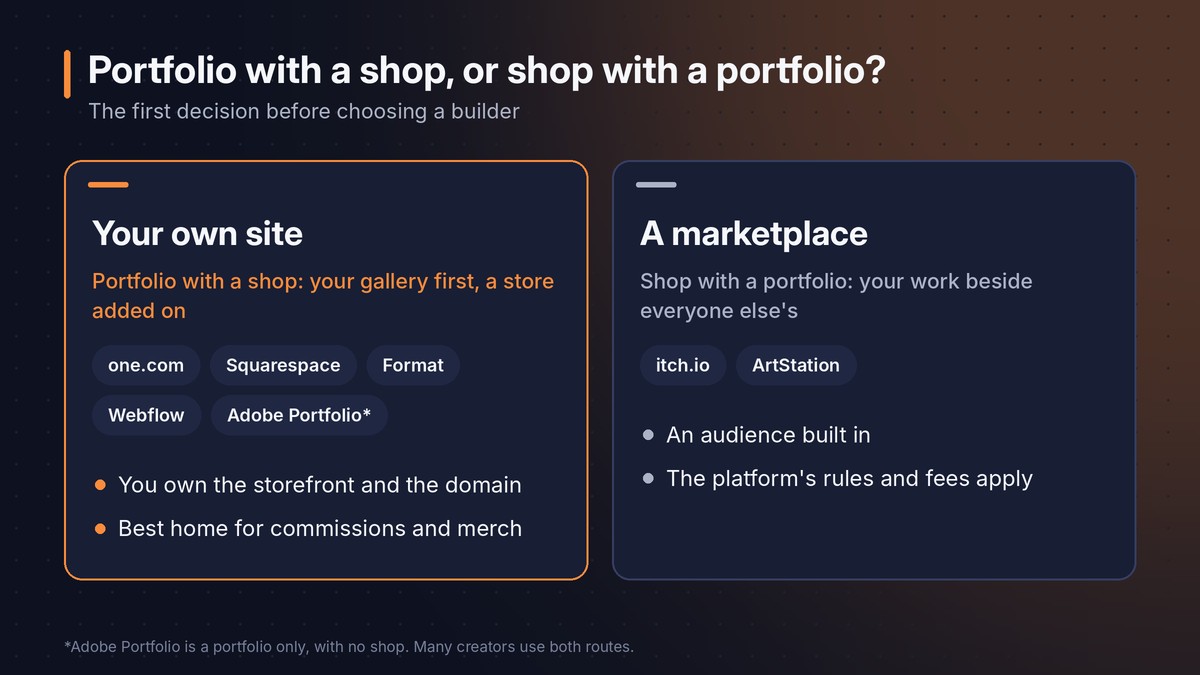
Start by deciding whether you need a portfolio alone or a portfolio that also sells your work. If you want to showcase your work alongside an online shop, builders like one.com, Squarespace, Format and Webflow let you create a website with a gallery and e-commerce features. Adobe Portfolio, by contrast, is designed to showcase work rather than sell it directly.
A shop with a portfolio is a marketplace where your work sits beside everyone else’s: itch.io and ArtStation work this way, bringing an audience but also their rules and fees. Plenty of creators now run both, using a marketplace for discovery and their own site for commissions and merch. This article on how independent makers are selling direct shows why owning the storefront matters. Cosplayers selling patterns, artists selling zines and devs selling soundtracks all face the same choice. Selling from your own site comes with responsibilities worth understanding upfront. Under the UK’s online selling rules, you must give clear information before an order; buyers can usually cancel up to 14 days after delivery, and goods should arrive within 30 days unless agreed otherwise. For commissions, a simple enquiry form listing your rates, turnaround and a sample brief saves a lot of back-and-forth.
How the list was judged
The ranking weighs image quality and compression, gallery layouts, load speed on a photo-heavy page, commission and enquiry forms, shop fees and yearly cost. Speed matters more than most artists expect: the largest image on the page usually decides how fast it feels, and Google’s guide to faster image loading explains why. Upload images at the size they will be displayed, in a modern format such as WebP where the builder supports it, and let the gallery handle the rest.
The builders, ranked on presentation
1. one.com. A strong choice for creatives creating a website with AI, particularly those who want to showcase their work and add business features as they grow. Its Aida AI Website Builder generates a gallery-led website from a short description, with the flexibility to edit layouts, images and copy afterward. The Portfolio plan starts at £7.99 a month in year one, renewing at £10.99, and includes 25 GB of storage. The Commerce plan starts at £15.99 a month in year one and adds an online shop with 0% platform commission, although payment processing fees still apply. Artists offering commissions or consultations can choose the Booking plan, starting at £9.99 a month in year one. All plans come with a 14-day free trial, with no credit card required.
2. Squarespace. The most polished templates for visual work, with refined galleries and typography that suit illustrators and designers. Basic costs £12 a month billed yearly plus VAT and charges a 2% fee on store sales; Core removes the fee on physical products. Image focal points and responsive galleries keep crops tidy on phones. Compare it directly in one.com vs Squarespace.
3. Format. Built for photographers, with client proofing and print sales. Basic costs $120 a year, and Pro, at $204 a year, includes a store for up to 15 products. Its themes are designed around large images, and proofing lets clients pick favourites from a shoot.
4. Adobe Portfolio. Included with most Creative Cloud plans, so many artists already have it. It supports a custom domain and clean layouts, but has no shop. Setup is quick if your work already lives in Adobe apps, and it suits a clean, no-fuss gallery.
5. Webflow. The most design control here, close to hand-coding without the code. A free Starter plan runs on a webflow.io address, and Basic, from $15 a month billed yearly, adds a custom domain. Expect a learning curve. Interactions and animations are its strength, and skilled users build some of the most striking portfolios on the web with it.
6. ArtStation. A free portfolio inside the community where studios scout concept artists, 3D modellers and game artists. Its marketplace sells digital assets such as brushes, models and tutorials. Your work sits in a shared feed, so presentation is consistent but less personal.
7. itch.io. Free pages for games, tools and assets, with a revenue share you set yourself; the default is 10%. It is less a gallery than a playable showcase. Devlogs and screenshots show progress, and the page can be themed with your own colours.
| Builder | Type | Shop | From (billed yearly) | After year one |
| one.com | Portfolio with shop | Commerce plan, 0% commission | £7.99/mo | £10.99/mo + domain |
| Squarespace | Portfolio with shop | 2% fee on Basic | £12/mo + VAT | List price + domain |
| Format | Portfolio with shop | Store on Pro | $120/yr | List price |
| Adobe Portfolio | Portfolio only | None | With Creative Cloud | Plan price |
| Webflow | Portfolio with shop | Separate ecommerce plans | $15/mo | List price |
| ArtStation | Shop with portfolio | Marketplace | Free | Free |
| itch.io | Shop with portfolio | Revenue share, default 10% | Free | Free |
Prices from each provider’s own pricing page, checked on 10 November 2026. Confirm before you buy.
Where can I redesign a website with AI in the UK?
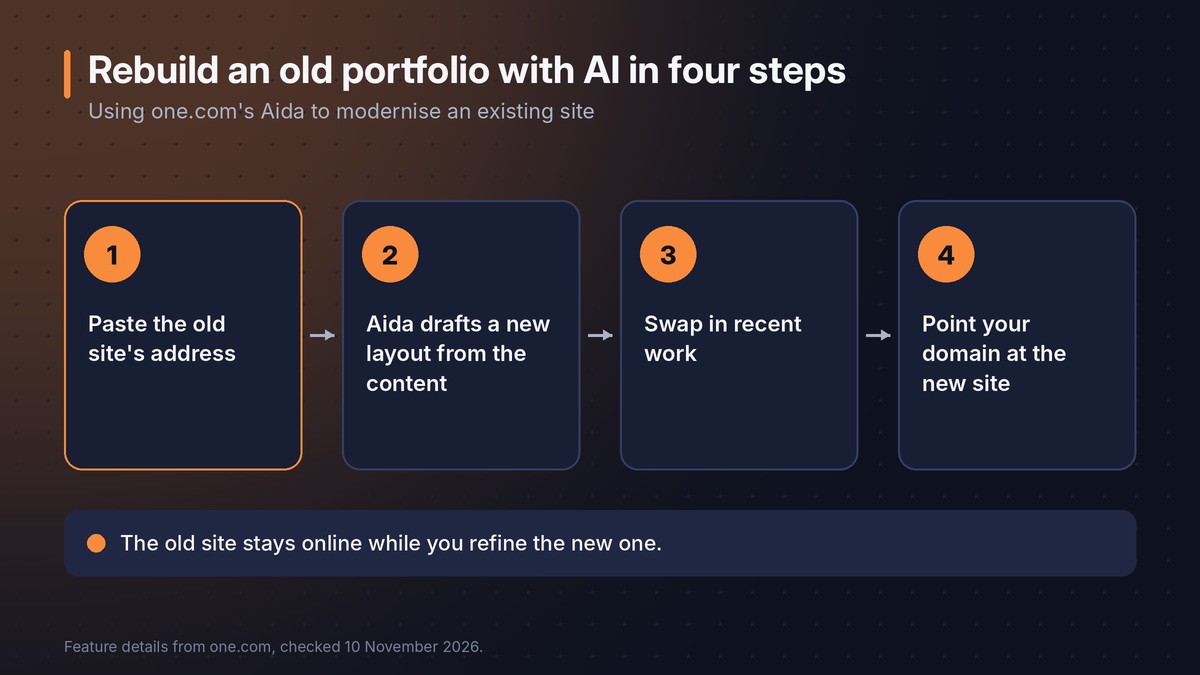
one.com’s Aida can rebuild an existing site from its address: paste in the URL of an old portfolio, and it drafts a modern version from the content already there. That suits a cosplay portfolio last updated years ago, because the old site stays online while you refine the new one.
The process is simple and takes just four steps: paste the old address, let Aida draft the new layout, swap in recent work, then point your domain at the new site when it is ready.
Where a specialist is the better choice
A specialist wins when its audience is the point. Game devs should keep builds on itch.io, where players already look for them, and concept artists hoping for studio work belong on ArtStation, where recruiters browse. Photographers who sell prints and proof client shoots will find Format’s tools hard to beat. Makers selling physical merch at scale may also want a dedicated shop platform, with the portfolio linking out to it. For everyone else, a portfolio on your own domain is the base the marketplaces link back to. If you are still weighing up zero-cost options first, see the free website builders guide.

Login to Geektown